Turn cloud object storage into local filesystems for Domino: Azure and Google
Author
TJ Lagundoye
Senior Solutions Engineer
Article topics
FUSE, Azure and GCP mountpoint, local file browsing, EDV
Intended audience
Platform engineers, DevOps teams, and Domino administrators looking to implement secure, scalable storage solutions for data science workloads
Overview and goals
The challenge: Data science teams using Domino on Azure or Google Cloud work with large datasets that already live in Azure Blob Storage or Google Cloud Storage, yet many interactive workflows still require filesystem-style access. Bridging this gap often leads to duplicated data, higher storage costs, longer workspace startup times, and added operational overhead.
The platform reality: In Azure and GCP deployments, storage access in Domino is tightly coupled to each cloud’s identity model and infrastructure boundaries. Solutions that do not account for these differences frequently lead to brittle integrations, inconsistent access behavior, and higher long-term platform maintenance costs as usage scales.
The opportunity: By adapting mount-based access patterns to Azure and GCP Domino deployments, organizations can expose existing cloud object storage as familiar directories inside Domino workspaces. This allows data science teams to iterate faster without staging data, while platform teams avoid maintaining parallel storage systems.
From a business perspective, this approach:
- Reduces storage duplication and infrastructure spend
- Shortens time-to-insight for analytics and machine learning initiatives
- Improves platform scalability without increasing operational complexity
This blueprint builds on the principles introduced in, “Transforming S3 into local storage,” extending them to Azure Blob Storage and Google Cloud Storage with a focus on cloud-specific considerations.
When should you consider running mount-based access on Domino?
Cost and storage scale: When your teams work with large volumes of data that already reside in Azure Blob Storage or Google Cloud Storage, and maintaining separate filesystem volumes adds unnecessary cost or data duplication. Mounting object storage directly helps avoid repeated transfers and minimizes the need for large, provisioned storage volumes.
Intuitive access for data science workflows: When data scientists need a directory-like, browsable experience inside their Domino workspaces, being able to navigate folders, open files, and operate on data using familiar filesystem tools instead of switching to cloud-specific commands or SDKs.
Cloud-native identity and security alignment: When your environment prioritizes strong access control and isolation, and you want to avoid granting elevated container privileges just to support traditional FUSE implementations. By integrating mountpoints at the platform level using Azure and GCP’s native identity and credential mechanisms, you preserve Domino’s secure execution model.
Shared access across environments: When the same storage buckets/containers must be accessed consistently by multiple Domino projects, teams, or external systems without maintaining duplicate copies.
Warning signs you need this:
- Storage costs for managed volumes are rising faster than actual utilization
- Teams are copying data out of cloud storage into workspace volumes for every analysis
- Data scientists ask for drag-and-drop, directory browsing, or a “shared folder” feel for cloud data
- Multiple environments or projects repeatedly sync the same object storage data
When NOT to use:
- When dataset sizes are modest and local or provisioned shared storage performs well
- When workloads involve heavy writes, require strict file locking, or depend on full POSIX semantics
- When programmatic access via cloud APIs or SDKs is sufficient for team needs
- When security policy prohibits even platform-level integration of mount services
What this means in practice
Mount-based access in Azure and GCP environments lets Domino users work with cloud datasets as if they were local directories, without moving data around or maintaining extra storage layers. It’s a good fit when you care about interactive exploration, cost efficiency, consistent access patterns, and platform security and it’s less suitable when workloads demand high-frequency writes or strict filesystem guarantees.
How can you achieve secure, familiar file system access in Domino workflows?
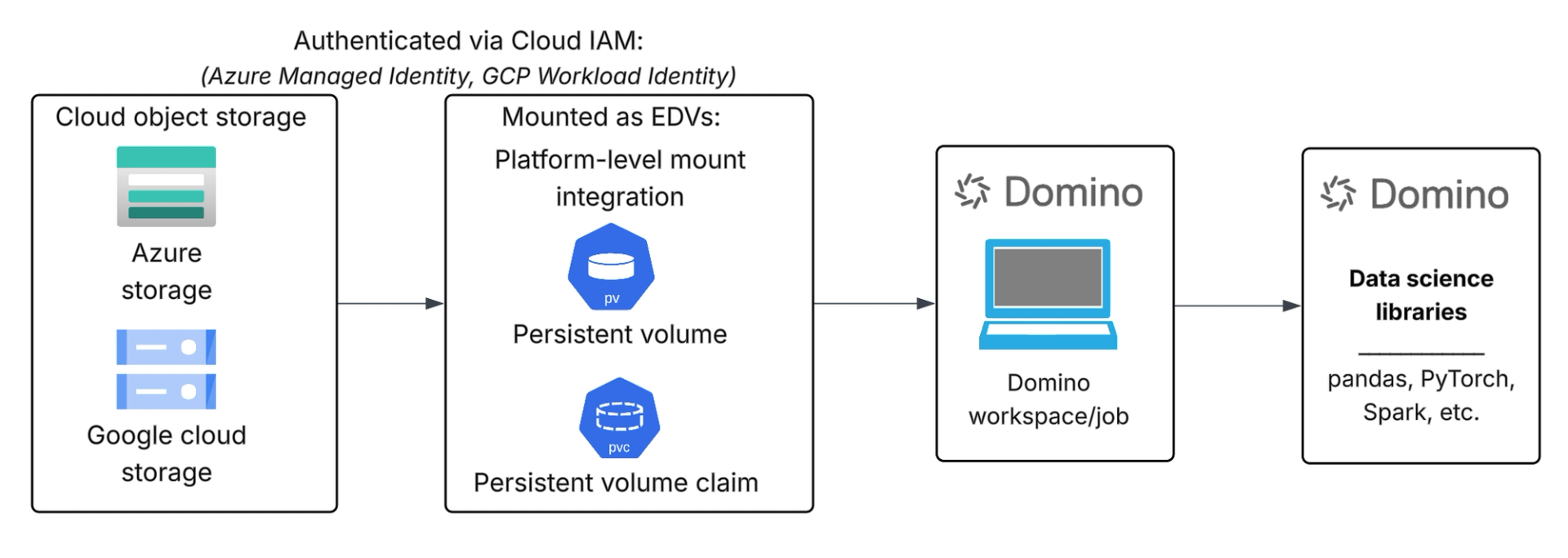
Secure, filesystem-style access in Domino is achieved by integrating cloud object storage at the platform layer, rather than inside individual user workloads.
The key principles are:
- Expose object storage without duplicating data: Azure Blob Storage and Google Cloud Storage remain the system of record. Data is accessed in place, avoiding repeated transfers into separate filesystem volumes and eliminating unnecessary storage duplication.
- Shift filesystem integration out of user containers: Instead of running filesystem tooling inside Domino workspaces, storage mounts are handled at the infrastructure or node level. This preserves Domino’s unprivileged execution model and avoids expanding the security boundary of user workloads.
- Rely on cloud-native identity and access controls: Access to storage is governed by Azure and GCP identity mechanisms, ensuring that permissions are enforced consistently and credentials are not embedded in user code or containers.
- Present storage through familiar directory paths: Mounted storage is surfaced inside Domino workspaces as standard directories, allowing data scientists to browse files, traverse folders, and read data using existing tools and libraries without changing their workflow.
- Maintain clear separation of responsibilities: Platform teams manage storage integration, access scope, and governance. Data science teams consume data through familiar filesystem semantics without needing to manage credentials, mounts, or infrastructure details.
In practice, this approach gives data scientists the experience of working with a shared filesystem while allowing organizations to maintain strong security boundaries, centralized governance, and cost-efficient use of cloud object storage

Prerequisites
Configuring mount-based access to Azure Blob Storage or Google Cloud Storage in Domino requires access to the relevant cloud account for storage and identity configuration, Kubernetes access to the Domino deployment, and Domino administrator privileges to define and manage External Data Volumes (EDVs).
High-level implementation steps
1. Cloud identity and access configuration: Configure cloud-native identity and access controls in Azure or Google Cloud to allow the Domino platform to access the required Blob containers or GCS buckets using least-privilege permissions, without embedding static credentials.
2. Deploy and enable the appropriate CSI driver: Enable the cloud provider’s CSI driver that supports object storage mounting for your Kubernetes cluster. For Azure, this includes the Azure Blob Storage CSI driver that allows mounting Blob containers as volumes. For Google Cloud, the Cloud Storage FUSE CSI driver lets GKE workloads mount Cloud Storage buckets as persistent volumes
3. Storage provisioning: Create or reference Kubernetes Persistent Volumes (PVs) and Persistent Volume Claims (PVCs) using the storage classes provided by the cloud CSI drivers, so that object storage is represented as Kubernetes-managed volumes usable by workloads.
4. Domino EDV integration: Register the mounted storage as a Domino External Data Volume (EDV), so it appears inside Domino workspaces and jobs as a familiar filesystem path, consistent with access controls and isolation policies.
Key configuration considerations
- Unique volume identifier per Blob container or GCS bucket
- Correct Kubernetes namespace for Domino compute
- Mount options suitable for shared, multi-user access
- Cloud identity scoped to intended storage resources
- Compute and storage in the same region for performance
Detailed implementation guidance, including CSI driver configuration, identity setup, and troubleshooting, is available in the official Azure Blob Storage CSI driver and Google Cloud Storage FUSE CSI driver documentation.
Validation
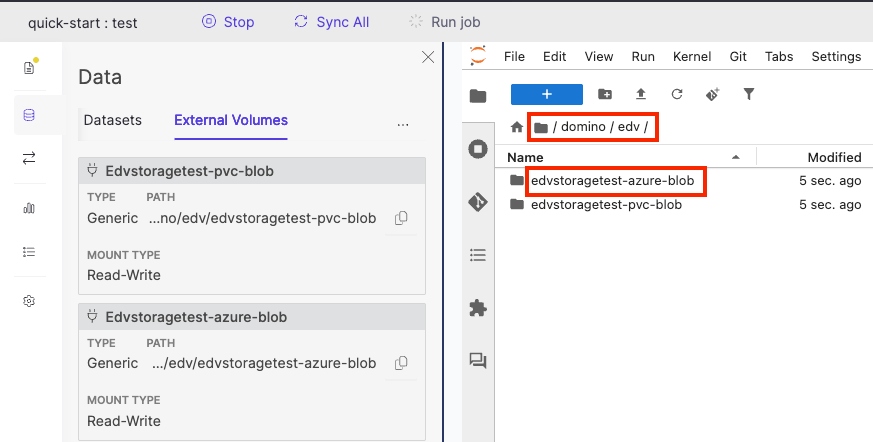
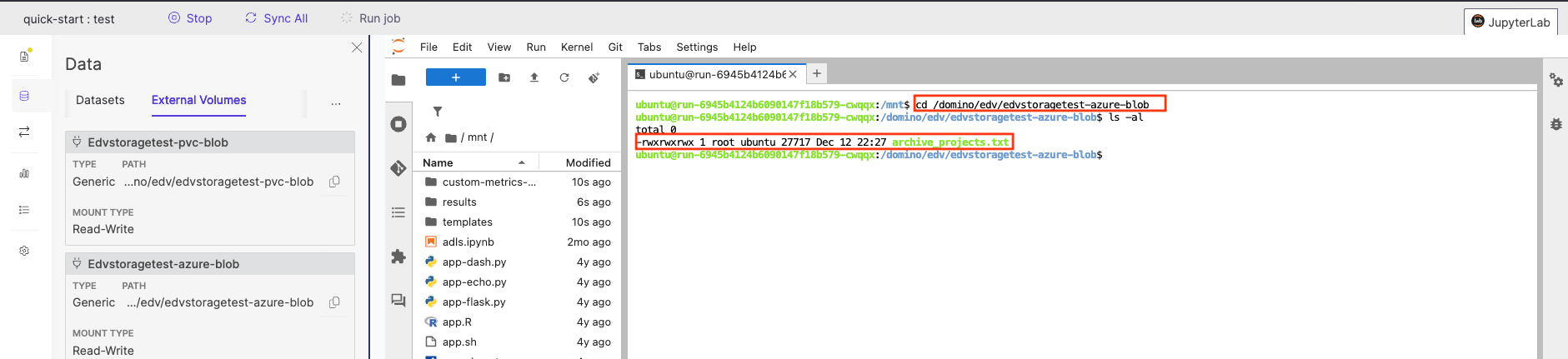
Create a Domino workspace with the EDV mounted and verify that data can be browsed and accessed through the mounted filesystem path.
Limitations
While mount-based access to cloud object storage provides a familiar filesystem experience in Domino, it does not offer the full semantics of a traditional POSIX filesystem.
Key limitations to be aware of:
- Object storage semantics still apply (no true file locking or atomic renames)
- Performance may vary for workloads with many small files or deep directory listings
- Write-heavy or concurrent write workloads are not a good fit
- Filesystem behavior depends on the capabilities and configuration of the underlying CSI driver
- Not all filesystem operations are supported or behave identically to local or network filesystems
This approach is best suited for read-heavy, exploratory data science workflows, and less appropriate for workloads that require strict POSIX guarantees or high-frequency writes.
Check out the GitHub repo


TJ Lagundoye
Senior Solutions Engineer
TJ is a Cloud and MLOps Engineer and Solutions Engineer at Domino Data Lab, where she works closely with customers across multiple industries to design secure, scalable data and machine learning platforms on Kubernetes. She specializes in cloud infrastructure across AWS, Azure, and GCP, identity-driven access patterns, and production-grade MLOps architectures, helping teams take AI projects from zero to production, solve real-world problems, and develop reusable platform blueprints that support future implementations.