LLM gateway, AI governance, access control, cost attribution, guardrails
Intended audience
Platform and AI infrastructure admins (primary). Data scientists, ML engineers, and AI engineers who consume the gateway (secondary)
Overview and goals
The challenge
Teams adopting LLMs inside a regulated enterprise hit the same wall. Provider keys are pasted into notebooks and shared across a project, so a single leak exposes the entire organization's spend. Cost is impossible to attribute when every request appears to come from a single account. Guardrails are enforced inconsistently because each project wires up its own client, and when a reviewer asks who called which model with what prompt, there is no single place to answer.
The solution
The LLM Gateway 2.0 (LLM Gateway) runs as a Domino App, giving platform teams a single control plane for every LLM call, whether it routes to an external vendor like OpenAI or Anthropic or to a model hosted inside Domino. Provider credentials are stored centrally and encrypted at rest, meaning end users never handle a vendor key, and access, budgets, and cost attribution are tied to Domino's own identity model of organizations, projects, users, and service accounts.
The LLM Gateway 2.0 exposes industry-standard API surfaces, so existing SDK code and coding assistants like Claude Code work against it unchanged. Every request is screened against configurable guardrails, priced against a built-in or custom rate book, and logged in an audit trail that can be mirrored to a warehouse for long-term retention. Since it is a Domino App, the LLM Gateway inherits Domino authentication and runs wherever Domino runs, including network-restricted environments. Over time, the LLM Gateway will be distributed as a default Domino Extension and folded into the core platform.
When should you consider a centralized LLM gateway in Domino?
The LLM Gateway is worth running when LLM access moves from a one-off experiment to shared infrastructure several teams depend on. Consider it when one or more of these is true:
You are sharing provider keys across notebooks and projects. One leaked key exposes the whole account, and revocation breaks everyone at once.
You need to attribute cost to a user, project, or org. A single shared key gives finance one undifferentiated bill.
You want content screening before data leaves your environment. PII patterns and prompt-injection attempts should be caught on the way out, not discovered in a provider's logs.
You are handing Claude Code or another coding assistant to a team. Coding assistants fan out many small requests per turn, and you want a budget ceiling and per-user attribution on that traffic.
You want a single place to update the model. As you move from one frontier model to the next, or from a self-hosted dev model to a more powerful cloud one, you want one spot to make that change rather than hunting through code.
You operate in a regulated or air-gapped environment. A SaaS gateway is off the table, so the control plane has to run on your own infrastructure under your identity provider.
How the LLM Gateway fits together
The LLM Gateway is a single application packaged as a self-contained binary. The same process serves the admin control-plane UI (providers, aliases, grants, budgets, guardrails, settings) and the request-serving API that callers hit. It persists state in a SQLite database on the project dataset, alongside the Fernet key that encrypts provider credentials.
Identity comes from Domino. With deep linking enabled, Domino delivers the viewer's signed JWT in the Authorization header, and the gateway decodes it locally to identify the caller and apply admin checks. The app owner must be a Domino admin so the gateway can read org memberships. Keep the gateway in its own isolated project with dataset access restricted to that owner, since the dataset holds both the database and the encryption key.
How to set up the LLM Gateway
Step 1. Install the LLM Gateway as a Domino App
The gateway ships as a versioned Linux tarball that can be dropped into a Domino project. No pip install runs at app boot, and no Python interpreter is required in the runtime container.
Prerequisites
A Domino admin as the app owner, so the gateway can see org memberships and admin-only API surfaces.
An isolated project with dataset access restricted to the admin owner.
A hardware tier with at least 2 CPU cores and 8 GB RAM. The gateway is lightweight, but the app container, uvicorn, and per-request adapter overhead require some headroom.
A compute environment based on the Domino Standard Environment.
Download, unpack, and publish
Get the latest llm-gateway-X.Y.Z-linux-x86_64.tar.gz release from your Domino CSM or Solutions Engineer. Then add a workspace inside the host project:
Bash / Shell
tar-xzf llm-gateway-*-linux-x86_64.tar.gz
# extracts to ./llm-gateway-X.Y.Z/ (binary + _internal/)
rm llm-gateway-*-linux-x86_64.tar.gz # optional, after verifying
The root-level app.sh launcher auto-detects the versioned folder by glob, so nothing needs renaming. In the project’s App tab, configure the settings below and click Publish. For publishing mechanics, see Publish and share an App. For background on each App option, see Configuration settings for Apps and App security and identity.
Setting
Value
Why
Run command
app.sh
Finds the unpacked binary and runs it on port 8888. Falls back to source mode if no binary is present.
Enable deep linking
ON
Delivers the viewer’s signed JWT in the Authorization header, which the gateway decodes to identify users and apply admin checks.
Allow App to act for viewers
OFF
The gateway only needs to know who the viewer is, not act as them. Acting-as would grant every viewer full Domino permissions, which is overprivileged for an LLM proxy.
View permissions
Anyone in Domino
Independent of access control. The gateway’s own grant layer decides who can actually call models regardless of who can see the UI. However, note that View access is required for a User to see the available models and use the model playground.
First boot
On first launch the gateway creates the SQLite database at <dataset>/llm_gateway/llm_gateway.db, generates the .gateway_key Fernet key next to it, and seeds the built-in Domino Platform provider so you can route to Domino-hosted models without configuring credentials. Open the app URL and start adding providers.
Step 2. Register providers and publish model aliases
A provider is an upstream integration plus its credentials. The LLM Gateway supports OpenAI, Anthropic, Azure OpenAI, AWS Bedrock, Google Vertex AI, OpenRouter, the built-in Domino Platform, and any generic OpenAI-compatible endpoint, including models you host inside Domino. Credentials are stored centrally and encrypted at rest, so end users never see them. Note that some providers, such as Vertex AI, require a service account JSON file and a region; see the provider setup for per-provider fields.
Aliases decouple clients from providers
An alias is a stable internal name that maps to one provider and model. Callers reference the alias, never the raw provider model ID, so you can repoint the alias at a different model, provider, or region without breaking client code. For each alias, you set capability tags so callers and the catalog UI know what the model supports, its pricing mode, and whether to enable exact-match response caching.
Pricing has two modes. Default pricing uses the gateway’s built-in price book for the underlying model. Custom pricing sets explicit per-million-token input and output rates, useful for negotiated rates or for a self-hosted model the price book does not know. Custom prices reprice only the reported prompt and completion tokens. Charges some providers add, such as cached input, reasoning tokens, or image tokens, are not always captured precisely, so treat custom-priced budgets as guardrails rather than invoices.
Step 3. Control access with identity-aware grants
Each alias is governed by grants that decide who can call it. When a request arrives, the gateway picks exactly one grant for the caller, and that single grant decides both whether the call is allowed and which budget applies. Grants are evaluated in order, and the first match wins.
Order
Grant tier
What it matches
1
User grant
A grant naming the caller directly.
2
Organization grant
A grant naming an org the caller belongs to.
3
Service account grant
A grant for the calling service account.
4
All-users grant
Open access to anyone authenticated.
5
Bring your own token grant
Fallback when no higher tier matches. Jumps ahead of every tier when the caller supplies their own provider key (see below).
Most specific wins. Once a tier matches, lower tiers are ignored. If a user has a personal user grant and the alias also has an all-users grant, their user grant governs their requests, including their personal budget. Access follows Domino’s identity model; when org membership syncs from your identity provider, gateway access updates automatically. Org memberships refresh on a cache cycle rather than in real time, so a newly added member may need a few minutes before the gateway recognizes the change.
Bring your own token (BYOT) is the one exception to most-specific-wins. Normally the BYOT grant sits at the bottom of the order as a fallback, but if the caller passes their own provider API key, the gateway routes to the BYOT grant up front, ahead of any more specific grant. BYOT calls are paid by the caller's own provider account, so gateway budgets do not apply to them.
Multi-org callers. When a caller belongs to several orgs, each with a grant, the gateway uses the grant with the largest remaining budget headroom first, then falls through to the next eligible org's grant if that one is exhausted. A caller can override the order with the X-LLM-Tag-Bill-Org header, which is honored only if they are actually a member of that org. Whichever org pays is the org the spend is attributed to.
Who administers the gateway. The admin UI is open to the app owner and any Domino SysAdmin. An admin can also promote individual users under Access Policies > Gateway Admins; promoted admins get full rights except for managing the admin list itself.
Every request the LLM Gateway serves records its estimated cost, attributed to the calling user and the paying org. Budgets are checked against this running tally on daily, weekly, or monthly periods. Two budgets can apply to a request, and both must pass.
Alias ceiling. A cap on the alias itself, applied to every request through it regardless of caller or grant. This is where you express “this model cannot burn more than $X per month total.” It applies even on BYOT calls, since the ceiling is an operational cap on the alias.
Per-caller grant budget. A cap on a specific user, org, or service-account grant, applied only to spend attributed to that grant. Use it for “Alice gets $200 per month” or “the finance team shares $5k per month.” All-users and BYOT grants carry no budget.
User budgets do not roll up into org budgets, and do not fall back to them. If a user has a personal $200 cap and her finance org has a $5k pool on the same alias, her spend counts against her own grant, and once she exhausts the $200 cap, she is denied rather than drawing from the org’s remaining headroom as a backup. That is usually what you want for an exception user. If you need a strict shared pool nobody can opt out of, clone the alias: one copy with the shared org grant, another for the exception users. Note that an empty budget field means unlimited, not zero. Entering 0 denies every request.
Step 5. Screen requests with guardrails
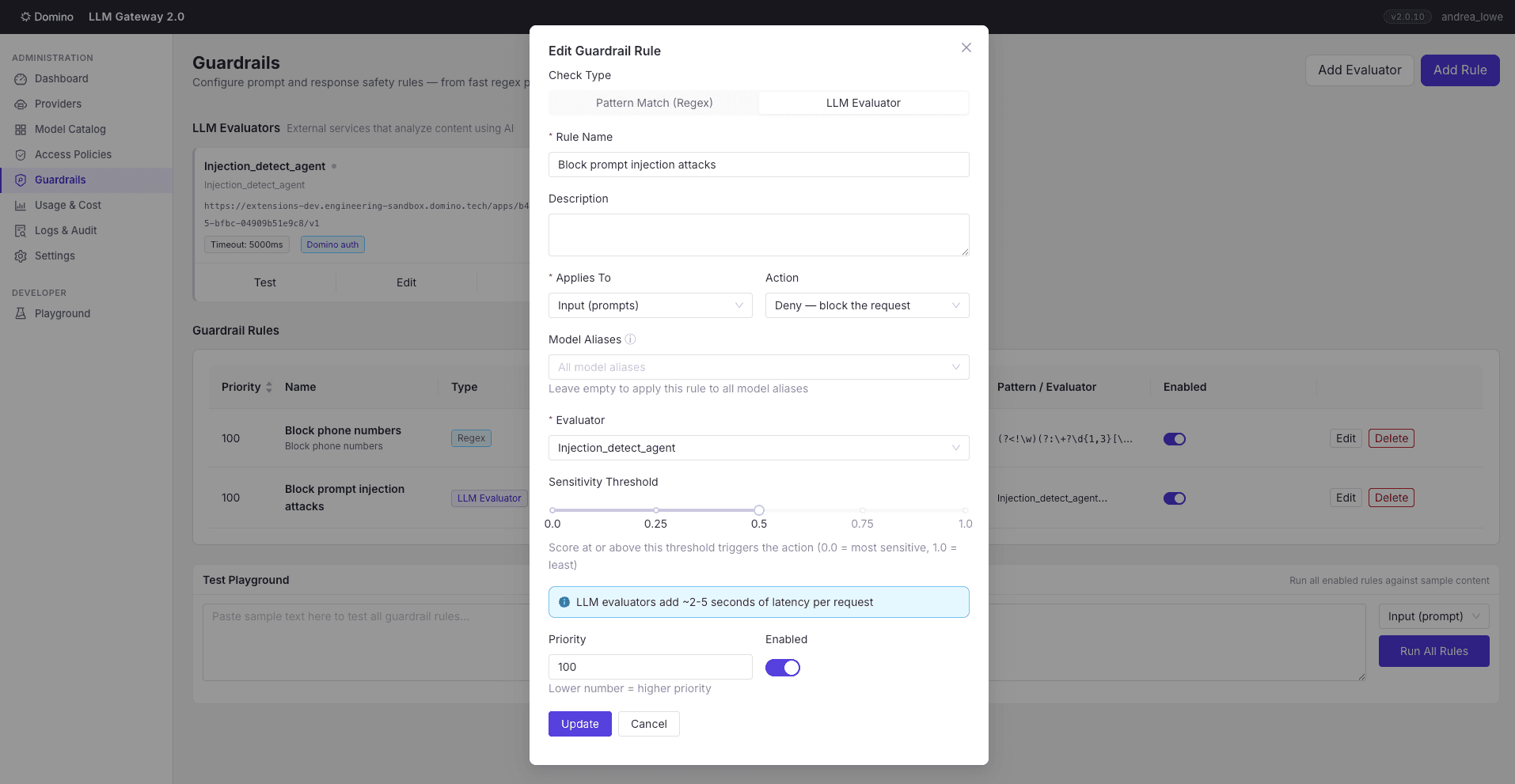
Guardrails are your boundary control. They're the checkpoint where a prompt is screened before it leaves your environment and a response is screened before a user sees it, so sensitive data and injection attempts get caught at the boundary rather than in a provider's logs. A rule has a direction (input, output, or both), an action (deny, redact, or log), and a check that is either a regex pattern or a call to an external LLM evaluator. Rules are global by default and can be scoped to specific aliases.
Regex (i.e., regular expression) rules run in milliseconds and are ideal for structured patterns such as phone numbers and other PII. LLM-evaluator rules call out to a separate evaluator agent, which can run as its own Domino App on the same platform, with authenticated communication between the gateway and the evaluator. The evaluator returns a score the gateway compares against the rule’s threshold, and you can mark each evaluator fail-open or fail-closed for when its endpoint times out. The pipeline runs cheap regex rules first, then escalates to the LLM evaluator.
Limits worth knowing:
Output guardrails on streaming responses are effectively log-only. Chunks are forwarded as they arrive, so by the time the full text is scannable, it has already reached the client. The rule still fires and is logged, but deny and redact degrade to log on the streaming path. Input scanning and non-streaming output enforce normally.
Only text is inspected. Image content blocks in multimodal requests are skipped, so a regex or PII rule cannot catch content embedded in an image.
Input scanning sees user-role text only. System prompts and tool or assistant messages are not concatenated into the scanned content, so a rule intended to detect an injection payload within a tool result will not fire.
LLM evaluators add latency. Each matching evaluator rule is an extra HTTP round trip, so budget its timeout_ms and prefer regex for high-volume checks.
Step 6. Call the gateway from applications and coding assistants
Calling from applications
The point of the LLM Gateway is that consuming it feels like calling a provider directly: existing code keeps working, there's no new SDK to learn, and no key to manage. The gateway exposes a standard OpenAI-compatible Chat Completions API and authenticates with the caller's own Domino identity. "OpenAI-compatible" describes the API shape, not the model behind it. An alias can resolve to any provider, so the same code reaches OpenAI, Anthropic, Bedrock, a Domino-hosted model, or a local one without changing.
To call the gateway, point the OpenAI SDK at the gateway base URL and set the model field to a gateway alias name rather than a vendor model ID. This is the only change your code needs.
Inside a Domino workspace, authentication is handled automatically. A local process called the sidecar runs alongside your workspace and vends you a Domino access token, so instead of managing an API key, you fetch the token with a single environment variable or helper call. No key to store or rotate.
Python
import urllib.request
from openai import OpenAI
# Get your Domino access token (works in any Domino workspace or job)
The Anthropic Messages ingress lets Claude Code talk to any alias natively, with the same grants, budgets, guardrails, and attribution as the OpenAI surface. The gateway automatically routes the request to the correct provider based on how the alias is configured, so Claude features pass through cleanly on native Claude aliases. Other assistants that support a custom endpoint work the same way: point Cursor, Cline, GitHub Copilot, or Codex at the gateway's OpenAI or Anthropic ingress, and they inherit the same governance, with authorization and attribution configured per tool. Auth and attribution are configured through two mechanisms: a settings.local.json file that tells the assistant to fetch its token from the workspace sidecar, and the environment variables that tag each request with your Domino project name so spend and usage are attributed correctly in the gateway.
To use Claude Code, first configure the workspaces your team launches so that they route their model calls through the gateway. If you own the compute environment your team uses, paste the setup script below into the environment's Pre-Run Script field. It runs as the user when the workspace starts, so every workspace built from that environment is pre-configured. See Customize your Environment for details.
Routing to local or self-hosted models
An alias can also resolve to a local or self-hosted model (Domino-hosted vLLM, Ollama, or any OpenAI-compatible endpoint), so an assistant can be powered by a private model. When the backend isn't a native Claude alias, requests pass through OpenAI translation and three Claude-only features are dropped: prompt-caching markers, extended thinking, and Anthropic-beta headers.
Once set up, Claude Code picks up the gateway URL and token helper from the settings the script wrote. Launch with claude --model <your-gateway-alias-name> in your IDE's integrated terminal. The script also sets CLAUDE_CODE_ATTRIBUTION_HEADER=0, which keeps the system-prompt bytes stable so prompt caching can hit.
Practical tip: Claude Code makes background calls to a cheaper Haiku model for titles and summaries. Register an alias named exactly claude-haiku-4-5-20251001 (the current Claude Code Haiku default), pointing at any provider that serves Haiku, or those side calls 404 in the logs while primary turns keep working. To note, budgets apply mid-session, so plan for many small requests rather than one large one.
Step 7. Monitor usage, cost, and audit activity
The gateway tracks every request and attributes it to a user, project, org, and alias. The Usage and Cost views break spend down by user, by model, or by cost over a chosen period, which is what makes project-level finance reporting possible. The Audit log is a searchable record of request activity and configuration changes, with a filter for guardrail events so a reviewer can see every blocked request and the rule that triggered it.
Operational health is visible in the admin UI under Settings > About, which shows whether the database is writable, how fresh the last backup is, the mirror queue depth and health, and the connection-pool counters. For external monitoring, the gateway also exposes a /health endpoint that tools can poll without authentication, with a ?verbose=1 option that returns the same operational fields.
Reliability with fallback chains
When a provider has an outage, rate-limits your traffic, or a model's budget runs out of funds, you don't want every request to fail. Fallback chains let the gateway automatically reroute to a backup model, so callers keep getting answers without changing any code. Each alias can carry an ordered fallback chain of other aliases. When the primary’s upstream errors or its budget is exhausted, the gateway transparently retries on the next link. Set it under Catalog > Edit Alias > Fallback chain. The chain advances only on failures a different model could plausibly recover from, and each trigger can be disabled individually, but all are on by default. timeout fires when the upstream takes longer than the per-attempt limit, 5xx covers provider-side server errors, 429 covers rate-limit responses, and budget_exhausted fires when the alias has hit its spending cap. Auth failures, guardrail denials, and malformed requests deliberately do not advance the chain, because retrying a different model would not help. A bad token, a blocked prompt, or a malformed request fails the same way everywhere, so the gateway returns the error instead of retrying against every link in the chain.
Each link in the chain is authorized as if the caller had requested it directly, so a fallback can never become a backdoor to a model the caller isn't granted access to. If the caller lacks access to a link, the gateway silently skips it and moves to the next one, rather than failing the request or revealing that the model exists. Every attempt is recorded as its own usage-log row, stamped with the fallback reason and the position in the chain, so you can see exactly when and why a fallback fired and which model ultimately served the request. A reply that came from a fallback also carries X-LLM-Fallback-Reason and X-LLM-Fallback-Served-By headers, so the calling code can tell it didn't get the primary model. One limit is worth knowing: failover is pre-flight only. Once a streaming response has started sending bytes to the client, an error partway through the stream propagates to the caller because the gateway can't retract what it has already sent and reroute midstream.
The diagram below traces a single request end-to-end: grant match, both budget checks, guardrails, and the call to the provider. The fallback loop retries the next link on the triggers above, so it's the full path every request in this guide follows.
Batch processing
When you have a large volume of prompts that don't need an immediate answer, such as classifying a dataset, running an evaluation suite, or enriching records overnight, batch processing lets you submit them as a single job and collect the results later, often at a lower cost than sending each request synchronously. The gateway exposes both vendor batch protocols, so the OpenAI and Anthropic batch SDKs work against it with the same identity, access, budget, guardrail, and attribution pipeline as synchronous calls. It is off by default, since enabling it opens a caller-facing file-upload and spend surface. Turn it on with the batch.enabled admin setting, no restart needed. Each line’s model is a gateway alias name, and all lines in a batch must resolve to the same alias.
Batches run in one of two modes, chosen at creation time from the resolved provider. Passthrough mode forwards to the vendor’s native batch API for OpenAI and Anthropic providers, so the 50 percent batch discount applies. Synthetic mode orchestrates per-line dispatch with bounded concurrency for everything else, providing a uniform batch surface across providers that lack a batch endpoint, without the vendor discount. Guardrails apply to every line in both modes, so enabling batches does not bypass guardrails.
Python
import urllib.request
from openai import OpenAI
# In a workspace or job, get your Domino access token from the local sidecar.
# For unattended automation, use a gateway-issued dgw_ token instead.
# read BOTH files: successes in output_file_id, failures in error_file_id
Two gotchas. Read the error file, not just the output file: failed lines land in error_file_id keyed by custom_id, and a batch can be completed with a null output file if every line failed. And construct the Anthropic SDK with auth_token= (which sends Authorization: Bearer), not api_key=, which the gateway ignores.
Keeping the database healthy over time
The gateway's state lives in a single SQLite file in the project dataset, and these three jobs keep it from growing without bounds, protect it with backups, and push long-term history to a warehouse for retention and compliance. The admin Settings page configures them, which are off by default. They run through Domino Scheduled Jobs, and the Settings page reconciles on every load if an admin edits those jobs directly in Domino.
Database backups. Online SQLite backups of llm_gateway.db on a daily, weekly, monthly, or quarterly schedule, with retention pruning and a Run now button. Backup files are vanilla SQLite and can be opened with any tool.
Log retention and purge. Scheduled deletion of usage and audit logs older than a horizon, floored at runtime by the longest active budget period so purging cannot zero out a user’s accumulated spend mid-period. A dry run shows row counts without deleting any rows.
External audit datasource. Mirror every usage and audit row to a Domino Data Source (Snowflake, Postgres, Redshift, BigQuery, MySQL, ClickHouse, or MariaDB) so local SQLite stays lean and full history lives in your warehouse. Mirroring is async, with end-to-end lag typically 5 to 15 seconds, and the mode is independent for each log type.
Purge and mirror compose into tiered storage safely. With both on, the purge worker automatically refuses to delete rows that have not yet been mirrored, so unmirrored history can never be lost. To connect to the warehouse target, see Connect a Data Source.
Practical tip: once mirroring is on, the Usage and Logs pages show a data-source picker for local SQLite (fast, scoped to the retention horizon) versus the warehouse (slower, full history). The picker is disabled on the Budgets tab on purpose, because budget figures are computed from the same local store the gateway checks on every request, so that view always matches what is actually being enforced.
Using the LLM Gateway (for end users)
The gateway provides a single approved endpoint to call large language models from your Domino work. You authenticate with your existing Domino identity, so there's no API key to request or manage, and you call models by a stable alias name your platform team has set up rather than a raw vendor model ID.
What you need from your admin
Three things: the gateway's base URL, the alias name of each model you're cleared to use, and confirmation that you've been granted access. Access follows your Domino identity, so if your team's org membership is synced, you may already have it. If a call comes back denied, ask your admin for a grant on that alias.
Calling a model from code
The fastest way to start is the gateway's playground. Pick the model you want, send a test prompt, and the playground generates a ready-to-paste code snippet with the base URL and your chosen alias already filled in. It produces snippets for Python, the Pydantic AI agent framework, TypeScript, and curl, with token fetching already wired in, so for most users, this is the whole job: open the playground, copy the snippet, paste it into your workspace.
If you'd rather write it by hand, the gateway supports the standard OpenAI Chat Completions API, so point the OpenAI SDK at the gateway's base URL and your existing code works unchanged. In a Domino workspace, your access token is automatically available from the local sidecar, so you can fetch it with a one-liner rather than managing a key. Set the model field to a gateway alias name, not a vendor model ID.
Python
import urllib.request
from openai import OpenAI
# Get your Domino access token (works in any Domino workspace or job)
If your admin has pre-wired your compute environment, launch from your project directory with claude --model <your-alias-name>; it routes through the gateway automatically, tagged to your project. If it isn't wired up, ask your admin to set up the Pre Run Script rather than configuring it by hand.
Practical tip: if a guardrail blocks a Claude Code turn, that text stays in the session context and keeps re-triggering the block. Start a fresh session to clear it, or switch to an alias that isn't scoped to that rule.
What to expect
You'll only see the aliases you've been granted, not the full catalog. Budgets and rate limits may apply to your usage, so a request can be denied once a cap is reached. Prompts and responses pass through guardrails, so a request containing something like a phone number or a prompt-injection pattern may be blocked or redacted. Every call is attributed to you, your project, and your org for cost tracking, so launching from the right project keeps your usage attributed correctly.
Where to go next
Once the gateway is serving traffic, the natural next steps are to tighten guardrails for your data-egress policy, integrate Claude Code into your shared compute environments, and enable warehouse mirroring so audit history outlives the local store. For the full installation guide, app settings, environment variables, and working examples, contact your CSM or Solutions Engineer.
Domino Professional Services
From tailored strategies to full-scale implementations, the team acts as an extension of yours — speeding up time-to-value, mitigating risk, and enabling responsible scale across AI initiatives.
Andrea Lowe, PhD is the Product Marketing Director for Data Science, AI, and ML at Domino Data Lab, where she drives go-to-market strategy and technical content for the platform. Over seven years at Domino, she has worked across training, sales engineering, product, and customer success, building a deep understanding of what it actually takes to deploy AI in regulated industries. Before entering tech, she was a neuroscientist turned data scientist.
Etan Lightstone
VP, Head of Product Design
A product design leader specializing in building and leading teams, Etan Lightstone focuses on shaping design strategy and vision for AI, MLOps, and data science software. As the VP, Head of Product Design at Domino Data Lab, he leverages a hybrid background in Design and Software Engineering to guide his team and design software experiences. Prior to Domino, he held key product design leadership roles at New Relic, Inc., and ShiftLeft, a cybersecurity company.