Customizing governance in Domino with Extensions
Author
Andrea Lowe
Product Marketing Director
Article topics
AI governance, model risk management, NIST AI RMF, SR 26-2, 21 CFR Part 11, EU AI Act, Domino Extensions
Andrea Lowe
Product Marketing Director
AI governance, model risk management, NIST AI RMF, SR 26-2, 21 CFR Part 11, EU AI Act, Domino Extensions
Model risk officers, governance administrators, model validators, ML platform and AI engineering teams
The challenge
Every regulated enterprise runs its model risk process differently. A bank answers to model risk supervisory guidance and has a validation function that signs off before deployment. A drug developer has to reconstruct a validated statistical run for an FDA auditor years after the study closed. A federal program maps every system to a control framework before it earns an authority to operate. The frameworks overlap, but the evidence each one demands, the people who approve it, and the point in the lifecycle where a gate has to hold are all specific to the organization.
Most governance tooling forces that specific process into a fixed workflow. Teams end up running the real process in spreadsheets and email, then re-entering it into a system of record for the audit. The record and the work drift apart, and that gap is where examiners find problems.
The solution
Treat the Governance Center as a configurable backbone. You define your own policies as stages, evidence, approvals, and gates, and Domino enforces them across the model and application lifecycle, with every run and every governance action recorded underneath. The same backbone that proves compliance to a regulator also governs output quality and reliability, so the same controls apply wherever a model's results have to be trusted.
When your process needs something the default UI does not surface, you do not have to wait for a platform release. You can build a custom Extension for your exact requirements. An Extension is a Domino App mounted in the Domino UI where your team already works.
This blueprint covers the core governance backbone, how to map named regulatory frameworks and your own custom policies onto it, how Extensions attach to that backbone, and example Solutions, Extensions the Domino team co-builds with customers to extend governance for a specific way of working. For the full reference, see the Governance docs.
Anything you govern in Domino goes in a bundle. A bundle holds the material you want to govern as a group (a registered model, its code, its datasets, an app, or an agent), and it is the object policies attach to. Every bundle starts in a Project, and the bundle is the system of record.
A policy defines the governance lifecycle a bundle has to move through. Policies are fully customizable, and you write them to reflect your own process. Each policy is built from stages, evidence, approvals, and gates.
Findings sit alongside the policy. They are the issues raised during review, and they attach to a bundle, usually to a specific piece of required evidence. Each finding has a severity, an assignee, and a due date, so nothing stays open without being flagged.
You define a policy once and attach it to as many bundles as need it, or stack several on one bundle, like a risk-tier control alongside a regional regulatory check.
Because every job in Domino already records its exact code, environment, command, and results as one immutable record, a policy's evidence can point straight to the run that produced it.
A policy is stages, evidence, approvals, and gates, and nothing else. So any framework that can be expressed as "these phases, this evidence, these sign-offs" can live in Domino as a policy. That covers the common regulatory frameworks, and anything your own risk function writes.
Framework | What it governs | How it maps to a Domino policy |
|---|---|---|
NIST AI RMF | Voluntary US framework for managing AI risk, organized around four functions: Govern, Map, Measure, Manage | Map, Measure, and Manage become policy stages. Map becomes use-case and context evidence, Measure becomes validation and testing evidence computed from runs, and Manage becomes ongoing monitoring evidence. Govern is the approval and audit layer across all three. |
SR 26-2 | US interagency supervisory guidance on model risk management, issued April 17, 2026, by the Federal Reserve, the OCC, and the FDIC, superseding SR 11-7 and SR 21-8. Covers model inventory, independent validation, and ongoing monitoring. It is non-binding, expected to be most relevant to banking organizations above $30B in total assets, and places generative and agentic AI outside its scope. | A lifecycle policy with an independent validation stage gated to a validator outside the development team, plus a revalidation stage whose cadence follows the model's materiality, which is the shift SR 26-2 makes away from fixed annual revalidation. Every model is inventoried as a governed bundle. |
21 CFR Part 11 | FDA rule on electronic records and electronic signatures, requiring record integrity, audit trails, access controls, and validated systems. | Approvals carry the sign-off record that supports the electronic-signature requirement, the immutable audit trail supports record-keeping, and gates require a validated run behind the record before it moves forward. An auditor can reconstruct a validated statistical run exactly, as long as its inputs were snapshotted. |
EU AI Act | EU regulation with tiered obligations on high-risk AI systems, including risk management, data governance, technical documentation, logging, human oversight, and accuracy | High-risk obligations map to policy stages for risk management, data governance, and technical documentation, with logging carried by the audit trail and human oversight enforced as a required approval before deployment. |
Your custom policy | Anything specific to your organization: an internal data-privacy standard, an infosec review, a fair-lending check | Write it as its own policy with the stages, evidence, and approvals your process defines, and apply it to the same bundles alongside the regulatory policies. |
Some of these frameworks are sector-specific, but two apply more broadly. The EU AI Act cuts across financial services and life sciences, and NIST AI RMF cuts across all regulated work. Build one policy for each of those and apply it wherever it is in scope.
You can apply more than one policy to a single project or model. A high-risk credit model can carry SR 26-2, the EU AI Act, and an internal fairness policy at the same time, each contributing its own stages, evidence, and approvals, all governed against the same underlying work and recorded in one audit trail. When frameworks overlap, each policy's evidence can point at the same validation run, so you map the model once and let each policy read what it needs. That is the difference between governing a model three times in three tools and governing it once against three standards.
Model your real process as policies first. Reach for an Extension when the default UI cannot express the workflow, since an Extension built before the process is modeled is a UI over a policy you have not written yet. The default Governance Center covers the backbone, so consider an Extension when your process needs one of these:
Policy Builder, below, handles the authoring workflow. The Governance Control Tower handles the portfolio view and the intake, and the SCE QC Dashboard handles the quality process. Event automation and auditor views follow the same pattern without a worked example here.
An Extension surfaces a Domino App in the Domino UI without changes to the core platform. When Domino's Solutions Team co-builds one with you to solve a specific governance problem, such as a risk dashboard or a model intake wizard, the result is a Solution. It packages the workflow, the domain logic, and the regulatory requirements your risk team enforces, shaped around the process you already run.
Under the hood, a Domino App runs the logic and calls the governance API. A mount point sets where the App appears and what context it receives. And extended identity propagation lets the App act as the person using it.
Because Extensions work through the governance API, the backbone enforces and the Extension only frames the work. Figure 1 shows how the pieces stack, and each example Solution later in this piece calls the API the same way.
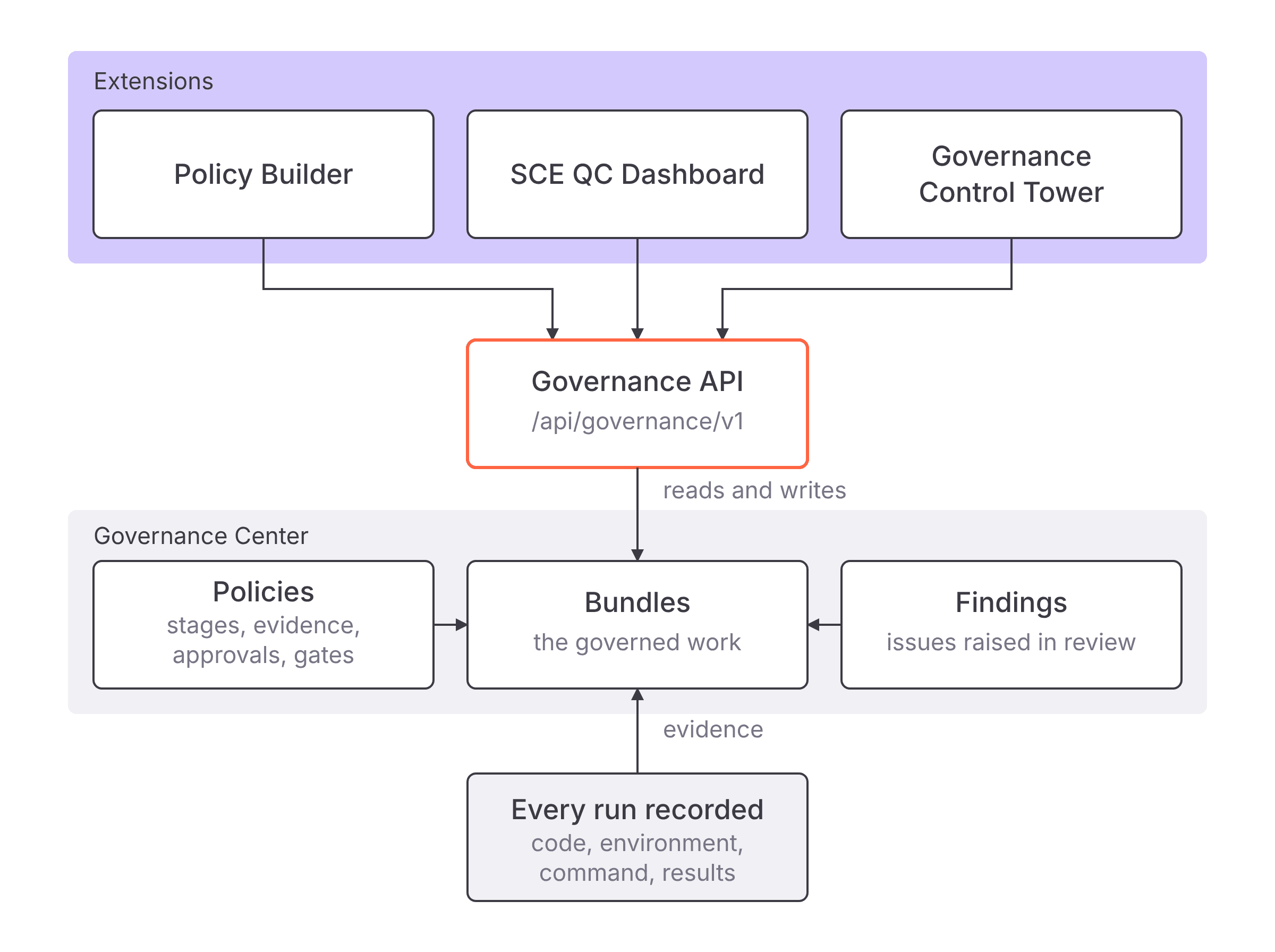
The governance API is the REST interface served at /api/governance/v1. It exposes policies and their definitions, bundles and their stages, evidence, approvals, findings, gates, and PDF reports, plus operations such as computing a policy against a bundle or submitting a result. It works on the same data the Governance Center UI does. An Extension's backend calls it to read governance state and to write changes, which is why an Extension can add a new view or workflow without the platform changing underneath it.
A mount point is the place in the Domino UI where an Extension appears. Domino opens the App in a new tab and passes the context of the originating page as query parameters on the App's root route, so the App knows which Project, Dataset, file, or Model the user came from.
Mount point | Where it appears | Query parameters the App receives |
|---|---|---|
Projects | A link in the Project sidebar |
|
Datasets | An entry on a Dataset details page |
|
Files | The three-dot menu for a file in a Dataset |
|
Models | An entry on a Model details page |
|
Admin | A new page in the Admin panel | None |
One App can back several Extensions, and a single Extension can be added at more than one mount point. Because a user can also reach the App's URL directly, your App should validate that the parameters it needs are present rather than assuming they are.
Every request to a Domino App already routes through Domino's proxy, which authenticates the viewer and tells the App who they are. How much the App can do with that identity depends on the level it was published with. An Extension requires extended identity, the fullest level.
domino-username header, which is enough for per-user defaults.Authorization header carrying the viewer's username, email, and Domino user ID. The token proves who the viewer is but is scoped to a limited set of endpoints.With extended identity propagation on, every call from the Extension's backend to the governance API runs as the signed-in user, under that user's permissions. An analyst who lacks permission to publish a policy is stopped by the API itself, not by logic the App author remembered to write. The audit trail names the person who took the action, which is what an examiner will ask for. And the App never needs an API key with more power than the person using it, so no over-privileged credential sits in the App's container.
These guardrails are what make extended identity safe to turn on:
A few practical requirements follow:
Authorization header rather than a stored API key.The Solutions below are examples of what the Domino team can build for a customer. They are bespoke customizations of Domino for your team rather than shipping product features. Each gives your team a new workflow without leaving the Domino UI it already uses.
The problem it solves
Governance teams think in prose. They have a model-risk standard, an SR 26-2 validation procedure, or a fair-lending review written as a policy document, and the people who write those documents are rarely the people who know the policy schema. Turning a twenty-page standard into a working policy definition means learning which parts of the schema map to stages and evidence, then hand-translating each clause without dropping one. That work is slow, it usually needs a specialist, and every edit to the source document means doing it again.
What it does
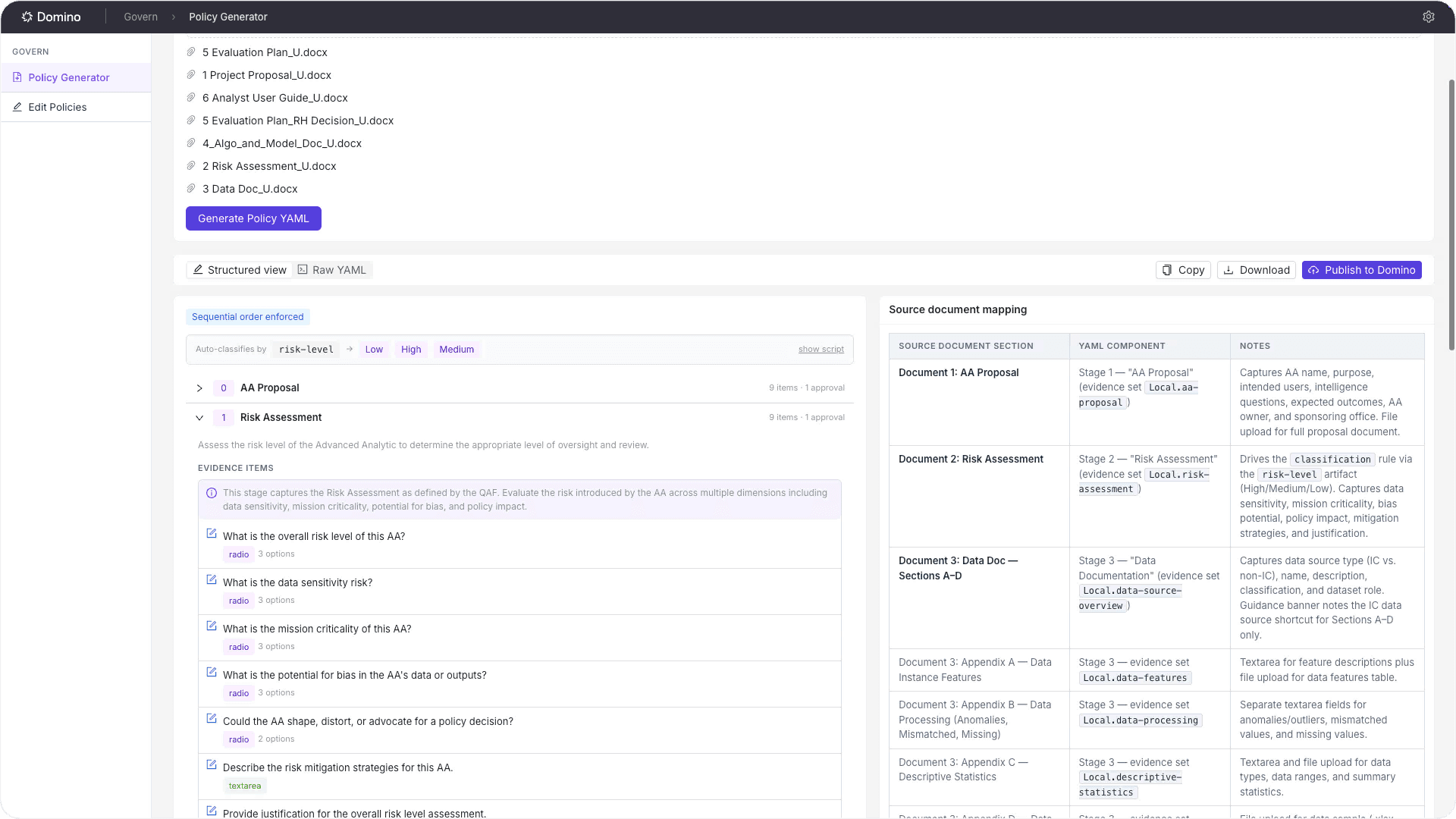
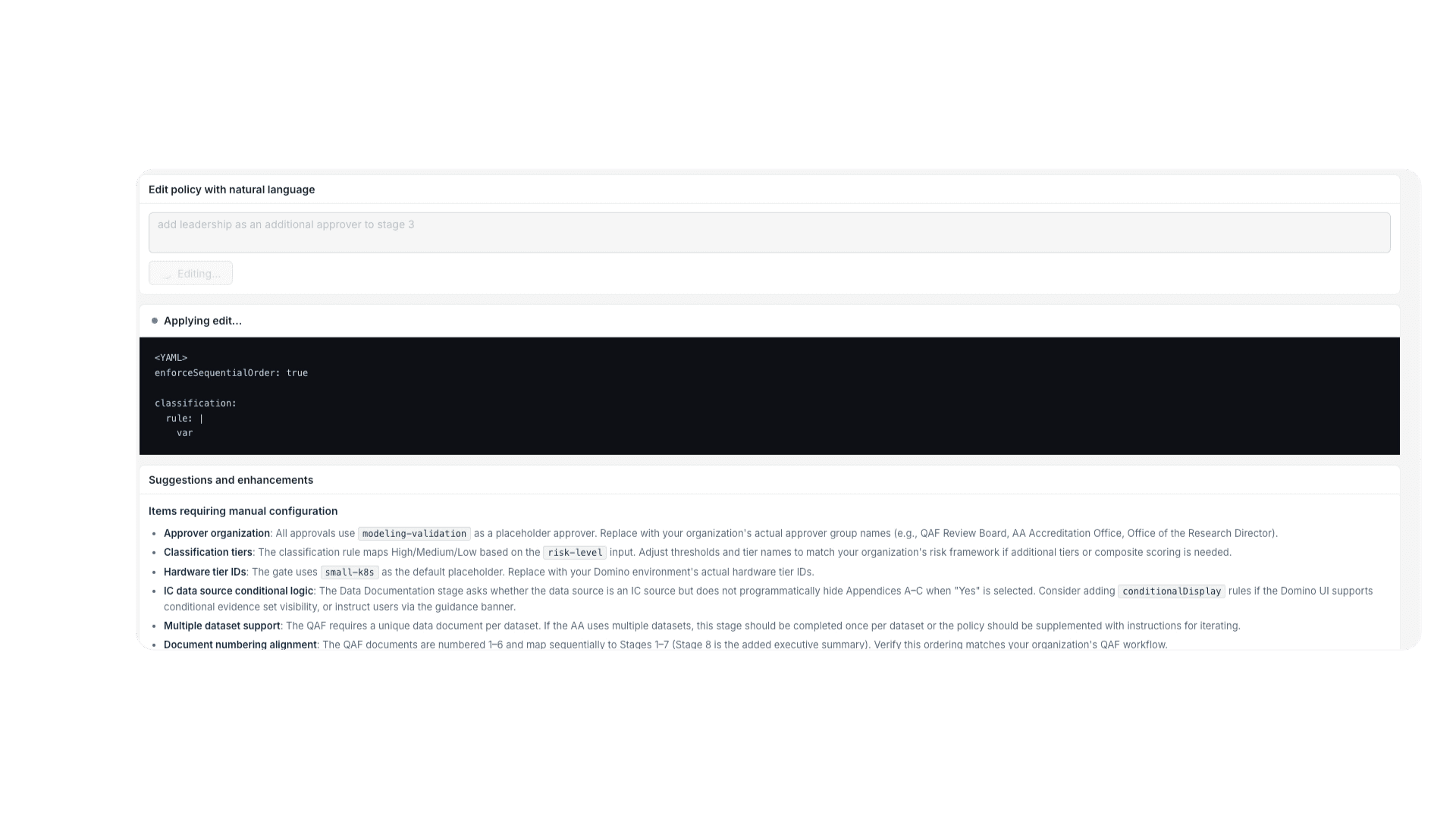
Policy Builder converts an unstructured policy document (PDF, DOCX, TXT, or Markdown) or a plain-language description into a valid Domino policy. You upload the standard or describe the process in natural language, and the App streams back a complete policy definition along with a source mapping, so a reviewer can click any generated stage and see the exact passage in the source document it came from. The author can keep refining it in natural language ("add an independent validation stage gated to someone outside the model team," "make the monitoring stage reopen every quarter"), and when they are satisfied, Policy Builder validates and publishes the policy to Domino in one action. The standard stays the source of truth, and writing the policy no longer depends on someone who knows the schema.
How it works
The App sends the source document to an LLM of your choosing, routed through LLM Gateway 2.0, with a governance-schema-aware prompt that constrains the output to the Domino policy structure, then streams the generated definition back so the author watches the policy take shape. Each generated element keeps a reference to its source span, which is what powers the mapping view. The author can edit any stage in natural language, and the App regenerates only that section. Before publishing, the App validates the definition by round-tripping it through the governance API. It submits the policy, reads it back, and flags anything the API rejected or changed, so an invalid policy never reaches your deployment.
How it uses the backbone
Policy Builder produces the same policy object a governance admin would author by hand: stages, evidence, approvals, and gates. Once published, it is a regular Domino policy you can apply to any bundle, alongside policies authored any other way. Every read and write uses the viewer's per-request token.
Representative API call
After the author accepts the generated policy, the App saves the YAML as the policy definition and moves the policy from Draft to Published. The definition endpoint takes a JSON body with the YAML as a string:
# Upload the generated YAML as the policy definitioncurl -X PUT "https://your-domino-host/api/governance/v1/policies/${POLICY_ID}/definition" \-H "Authorization: Bearer ${DOMINO_JWT}" \-H "Content-Type: application/json" \-d "$(jq -Rs '{definition: .}' policy.yaml)"
# Move the policy from Draft to Published so it can be applied to bundlescurl -X PUT "https://your-domino-host/api/governance/v1/policies/${POLICY_ID}/status" \-H "Authorization: Bearer ${DOMINO_JWT}" \-H "Content-Type: application/json" \-d '{"status": "Published"}'The problem it solves
A clinical programming team running quality control (QC) in a statistical computing environment (SCE) tracks many deliverables at once, and the per-bundle view answers one question at a time. A QC lead needs the portfolio answer: which deliverables sit in which stage, where findings are stacking up by severity, who owns each open stage, where work is unassigned, and whether any milestone is about to slip. Without that rollup, the lead rebuilds it by hand in a spreadsheet every week, and the spreadsheet is stale the moment a stage moves.
What it does
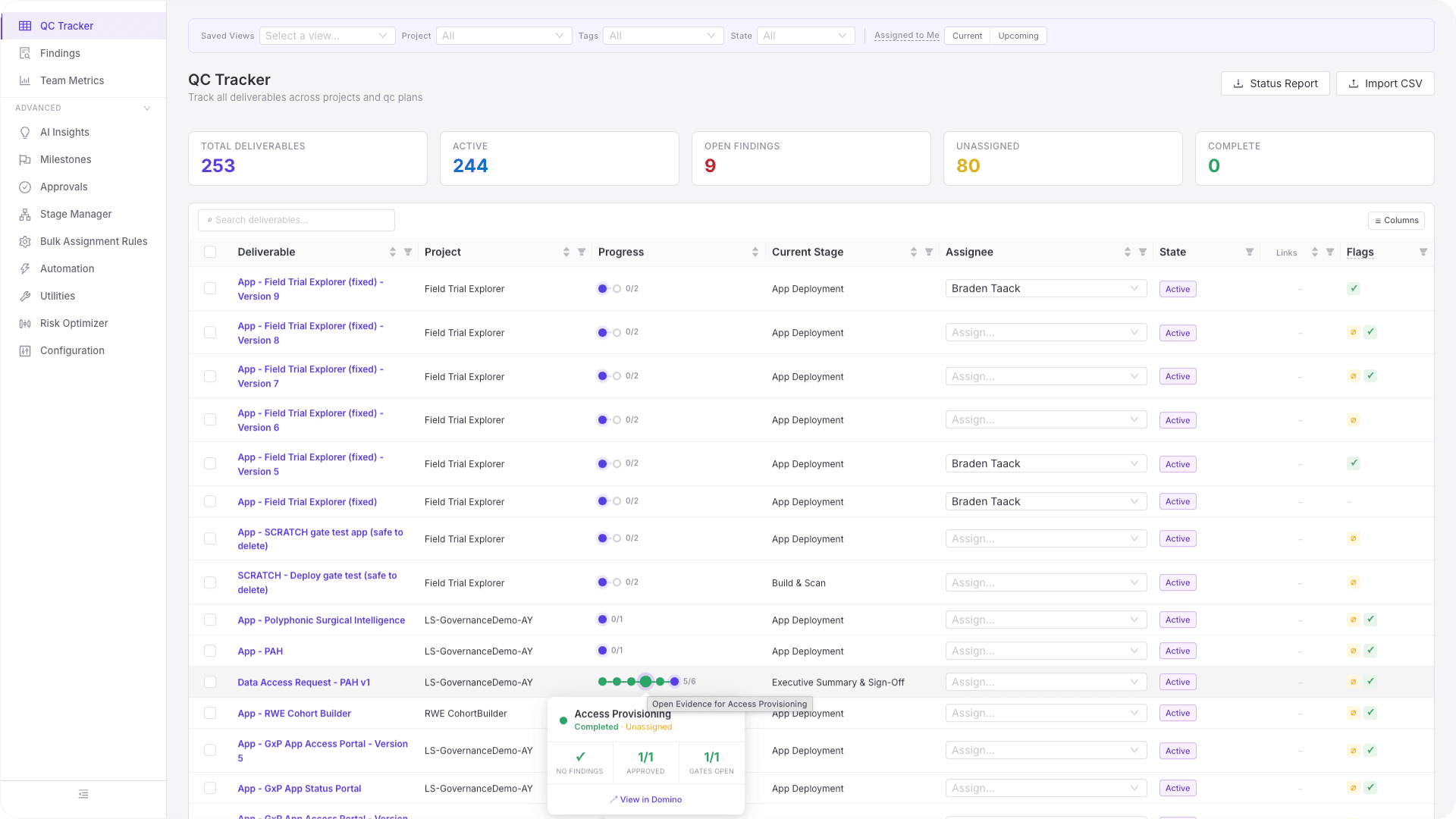
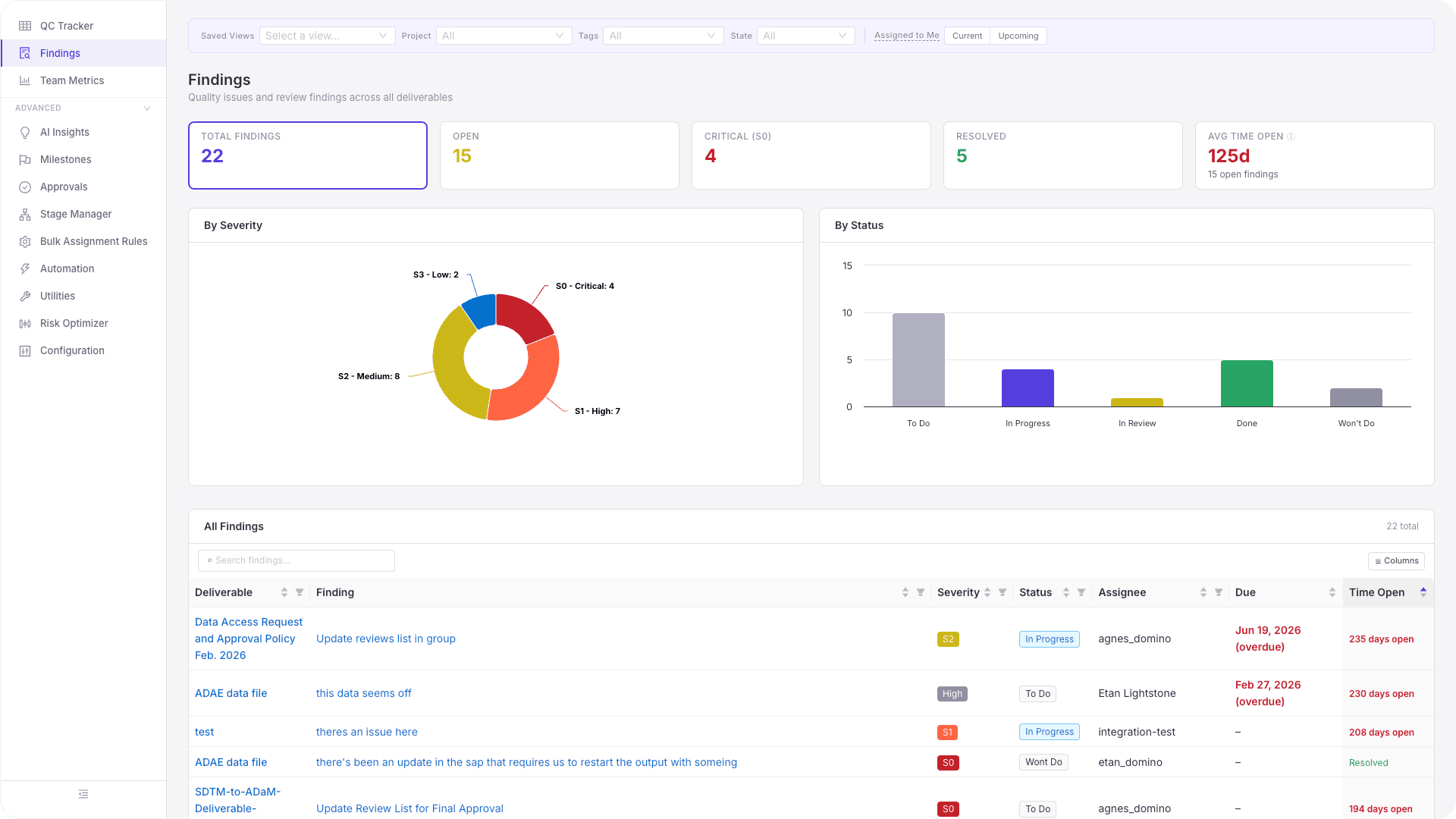
The SCE QC Dashboard is a control layer over the governance data for a whole program. It spans a set of working views: a QC tracker showing every deliverable and its stage progress, a portfolio overview with status and workload charts, a milestones view, an approvals queue, aggregated findings, team metrics, a stage manager for reassigning owners, and bulk assignment rules. It reads the live governance state and presents it as the QC workflow a program can run on.
How it works
A FastAPI backend proxies the Domino governance and platform APIs with the forwarded bearer token and shapes the responses into the dashboard's views. Reads pull bundles, stages, findings, and approvals across the portfolio. The dashboard writes back to Domino in two places, reassigning a stage owner and creating a bundle, and every other view is read-only.
How it uses the backbone
The QC views are derived from governance objects: bundles are the deliverables, stages are the QC phases, approvals are the sign-offs, and findings are the QC issues. Because a deliverable can be governed by more than one policy, the tracker shows each policy's stages against the same bundle, so a deliverable under both an internal QC policy and a regulatory policy appears once with both lifecycles visible. Reassigning a stage writes straight back to that bundle, and the change appears in the audit trail like any other governance action.
Representative API call
Reassign the owner of a stage on a deliverable's bundle so the QC lead can rebalance workload. The stage endpoint takes the assignee's user ID and display name:
import osimport httpxfrom fastapi import FastAPI, Header, HTTPException
app = FastAPI()DOMINO_HOST = os.getenv("DOMINO_API_HOST", "https://your-domino-host")

@app.patch("/api/qc/reassign-stage")async def reassign_stage_owner(    bundle_id: str,    stage_id: str,    assignee_id: str,    assignee_name: str,    authorization: str = Header(...),):    """    Reassigns a stage owner on a bundle, running under the    signed-in user's forwarded token.    """    url = f"{DOMINO_HOST}/api/governance/v1/bundles/{bundle_id}/stages/{stage_id}"    headers = {"Authorization": authorization, "Content-Type": "application/json"}    payload = {"assignee": {"id": assignee_id, "name": assignee_name}}
    async with httpx.AsyncClient() as client:        response = await client.patch(url, headers=headers, json=payload)
if response.status_code != 200: raise HTTPException( status_code=response.status_code, detail=f"Governance API error: {response.text}", ) return response.json()The problem it solves
A bank or insurer model risk management (MRM) team owns the whole model portfolio and answers to a regulator for all of it. The questions they field are portfolio questions: how many models are in each risk tier, which ones meet SR 26-2 and the EU AI Act requirements right now, what findings are open and overdue, which models are drifting in production, and can we produce a board-ready report by Friday. Answering those from the per-model view means opening every model in turn and assembling the picture by hand, which does not scale and is never quite current.
What it does
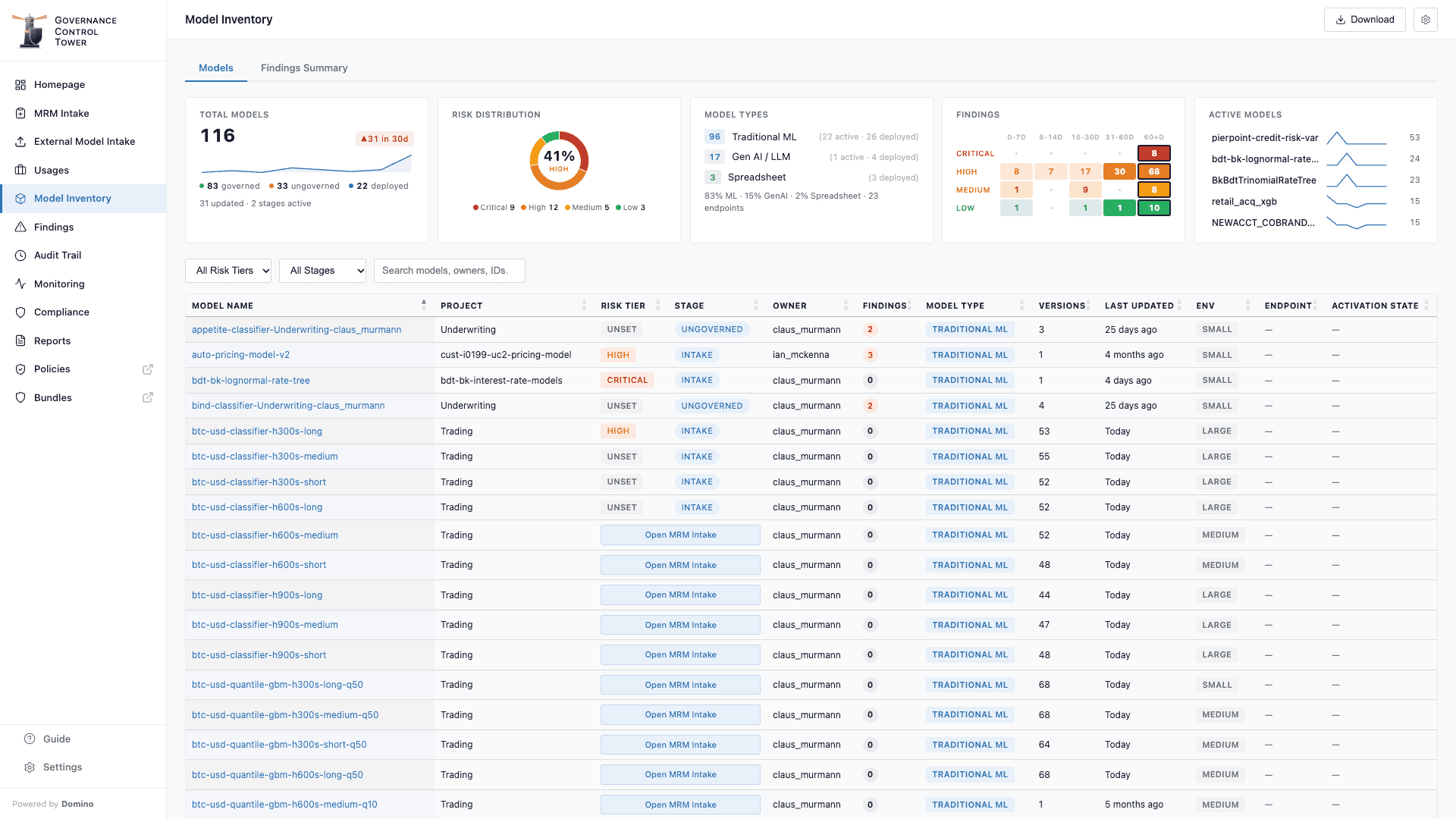
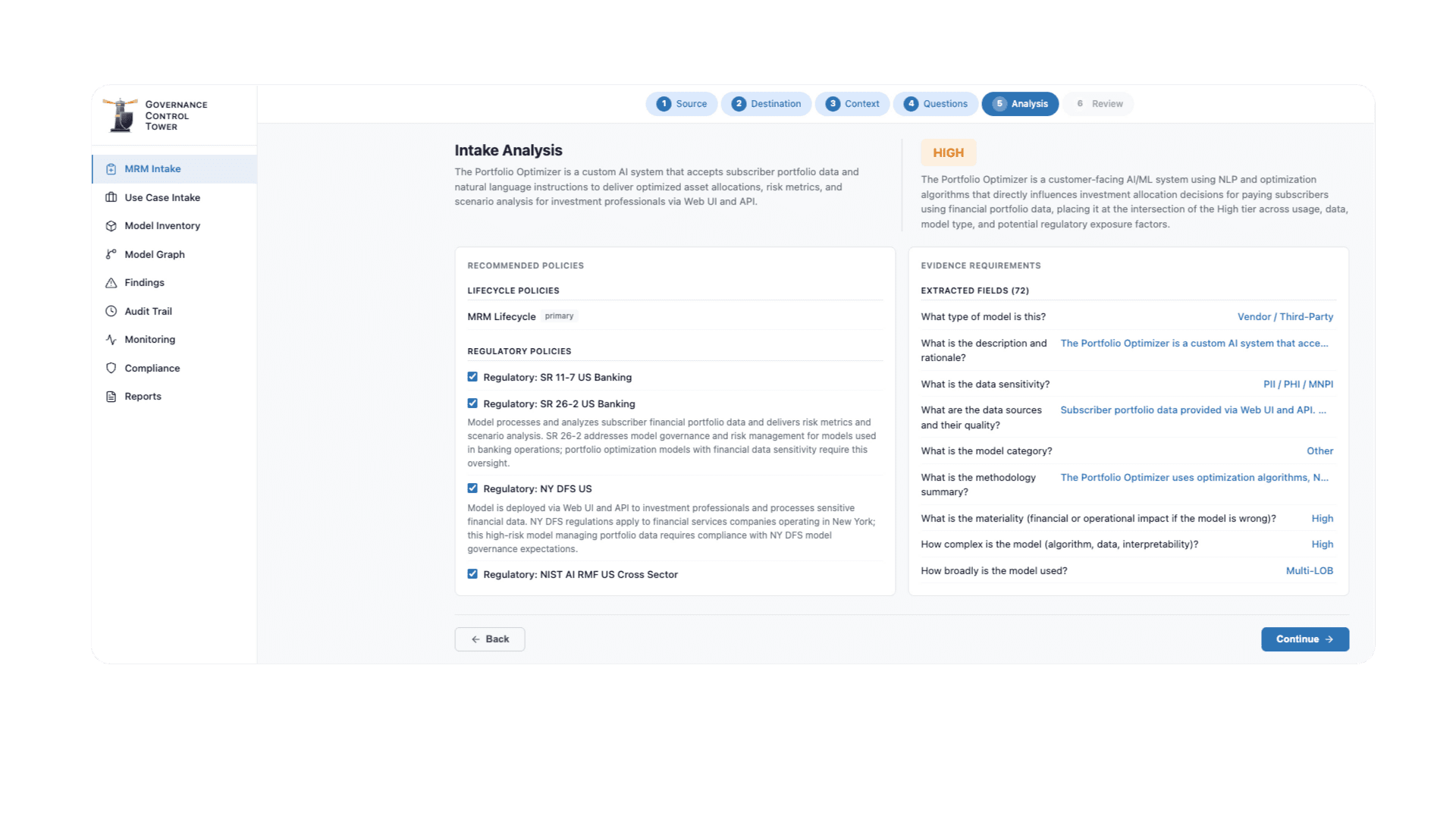
The Governance Control Tower is a single MRM portal over the portfolio. It includes a model inventory with risk tiers, a compliance view of every asset against each active framework, a findings dashboard, a full audit trail, live monitoring, and a report library covering board and examiner formats. An intake wizard brings vendor models, spreadsheet models, and models built in Domino through the same review. It reads the model's documentation, drafts the questionnaire answers, and proposes a risk tier for a risk officer to confirm. It is configurable down to the inventory columns, the lifecycle stages, and which regulations are in scope, with SR 26-2 and the EU AI Act enabled by default. The board's and the examiner's questions are answered from the same record.
How it works
The backend reads models, bundles, evidence, findings, policies, and monitoring data from Domino's APIs and derives compliance posture by matching the evidence present on a bundle against each regulation's stage requirements, so a model shows as compliant with a framework only when the evidence that framework demands is there. The AI-assisted intake uses a fast model to draft answers and a reasoning model to justify the proposed risk tier, with a human confirming before anything is written. Bringing a model under governance creates a bundle in Domino, and that action appears in the audit trail.
How it uses the backbone. The Control Tower gives you a view and a framing of the data, and Domino is still where the official records live. The App computes compliance from governance evidence on each read, so the view changes as evidence arrives and stages close. Because a model can be governed by several policies at once, the compliance view shows one model against every in-scope framework side by side, SR 26-2, the EU AI Act, and any internal policy, each evaluated from the same evidence. Reports draw on the same governance objects, so a board report and an examiner's evidence package come straight from the record.
Representative API call. Pull the governed bundle inventory to populate the compliance view, then download a bundle's PDF report for an examiner:
# List governed bundles for the portfolio inventorycurl -X GET "https://your-domino-host/api/governance/v1/bundles" \  -H "Authorization: Bearer ${DOMINO_JWT}"
# Download the PDF governance report for one bundlecurl -X GET "https://your-domino-host/api/governance/v1/bundles/${BUNDLE_ID}/report" \  -H "Authorization: Bearer ${DOMINO_JWT}" \  -o bundle-report.pdf
For compliance status that recomputes as evidence lands, POST /api/governance/v1/rpc/compute-policy takes a bundleId and a policyId and returns where each stage, approval, and gate stands for that policy on that bundle. Call it once per policy applied to the bundle to build the multi-framework compliance row.
For the governance backbone and policy authoring, see the Governance docs and the governance API reference. For building the Extensions themselves, see Create and manage Extensions and the App security and identity page, which covers the three identity levels in detail. And if your team builds Extensions with a coding assistant, Domino Skills covers how to give the assistant full platform context.
From tailored strategies to full-scale implementations, the team acts as an extension of yours — speeding up time-to-value, mitigating risk, and enabling responsible scale across AI initiatives.

Product Marketing Director, Data Science/AI/ML
Domino Data Lab
